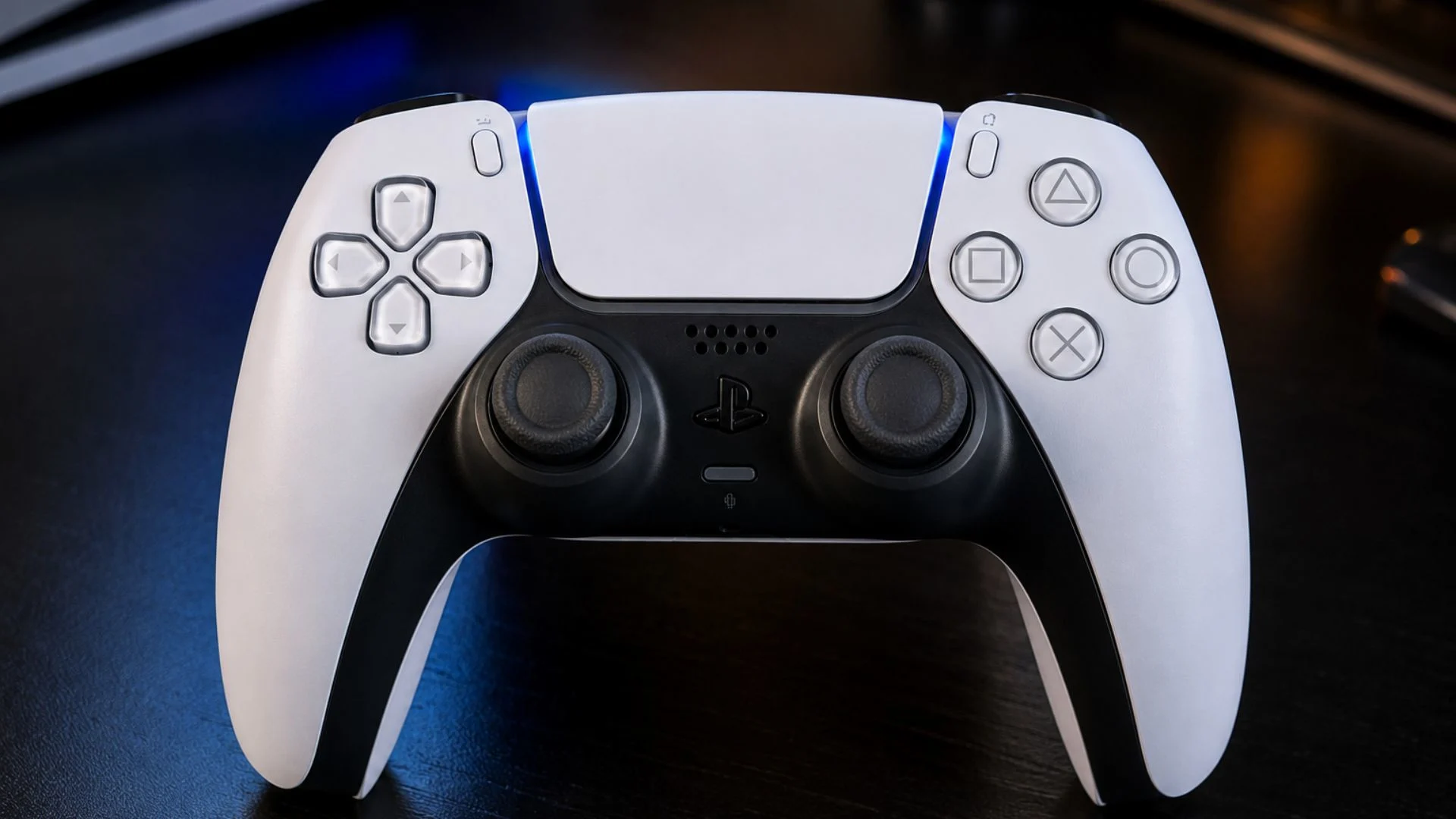
When Sony dropped the PlayStation 5, they didn’t just give us a new console. They gave us a whole new way to feel games. The PS5 controller is officially called the PlayStation 5 DualSense controller. It is a big deal. This is not your older brother’s clunky controller. This thing is smart. It’s packed with tech that makes games feel real. You can feel rain, dirt, and even the tension of a bowstring.
If you are looking for the Sony PS5 controller, you’ve come to the right place. This guide breaks down everything you need to know about the DualSense wireless controller. We will talk about the PS5 game controller’s features, price, and what it’s like to use. This is the official PS5 controller, and it changes how you play.
Think of it as the brain of your gaming setup. It is more than just a PlayStation controller. It is a magic wand for gamers. It is one of the best PlayStation 5 accessories you can buy. Let’s dive in.
Table of Contents
What Makes the PS5 Controller So Special?
The PS5 controller is special because of how it feels. It’s not just about pressing buttons anymore. It’s about feeling the game. The big secret is haptic feedback. Instead of just rumbling, the controller uses dual actuators to create precise vibrations. You feel different textures. A car driving on gravel feels different than a car driving on grass. This is a huge leap forward.
The DualSense wireless controller also has adaptive triggers. These are on the L2 and R2 buttons. They can add tension. Imagine you are pulling a bowstring. The trigger gets harder to press. It feels like you are actually pulling the string. Or, if your gun jams in a game, the trigger locks up. This makes the game way more immersive.
⚙️ DualSense Wireless Controller PS5
| Specification | Details |
|---|---|
| Input Power Rating | 5 V ⎓ 1,500 mA |
| Battery Type | Built‑in lithium‑ion (Li‑ion) rechargeable |
| Battery Voltage | 3.7 V ⎓ |
| Battery Capacity | 1,050 mAh official spec |
| Mass (weight) | Approx. 325 g |
| Dimensions (W × H × D) | 160 × 66 × 106 mm (approx.) |
| Operating Temperature | 5 °C – 35 °C |
| Bluetooth Version | Bluetooth 5.1 |
| USB Connector | USB Type‑C charging & data |
| Connectivity | Wireless (Bluetooth) + USB wired |
| Gaming Platforms | PlayStation®5, PC, Mac, iOS, iPadOS, tvOS, Android |
🎮 Core Gaming Features
| Feature | Description |
|---|---|
| Haptic Feedback | Dual actuators deliver precise, dynamic vibrations — from raindrops to weapon recoil. |
| Adaptive Triggers (L2 / R2) | Variable resistance simulates tension — bowstrings, brakes, or gear jams. |
| Built‑in Microphone | Chat without a headset, plus a dedicated mute button for privacy. |
| Integrated Speaker | High‑fidelity in‑game audio directly from the controller. |
| Motion Sensor | 6‑axis system (gyroscope + accelerometer) for intuitive tilt and aim controls. |
| Create Button | Instant capture, screenshot, and broadcast tools. |
| Touch Pad | Interactive surface with click functionality. |
| Light Bar | Multi‑colour LED (red / green / blue) for player ID and game feedback. |
📦 Additional Details
| Category | Specification / Value |
|---|---|
| Total Buttons | 14 (including analog sticks, D‑pad, action buttons, triggers, and function keys) |
| Audio Port | 3.5 mm combo headphone / mic jack |
| Charging | USB‑C (cable included) · compatible with charging stations |
| Battery Life | Approx. 6–12 hours depending on game and feature usage |
| Box Contents | DualSense controller · USB‑C cable · printed manual |
| Colour Options | White, Black, Galactic Purple, Cosmic Red, Nova Pink, and more |
🔧 Stick Module (for DualSense Edge)
| Specification | Details |
|---|---|
| External Dimensions | Approx. 30 × 31 × 40 mm (width × height × depth) |
| Operating Temperature | 5 °C – 35 °C |
| Mass | Approx. 15 g |
| Compatibility | DualSense Edge wireless controller (hot‑swappable) |
Decoding the Tech: Haptic Feedback and Adaptive Triggers
It uses precise vibrations that simulate in-game sensations. If you walk on a metal bridge, you feel a ringing in your hands. If you sneak through tall grass, you feel the swish. It adds a layer of depth that was missing before.
Then you have the adaptive triggers. They change resistance on the fly. This is a huge innovation. It changes how you interact with game environments. It makes every action feel more intense. Whether you are braking a vehicle or firing a weapon, the tension in your fingers matches the action on screen. It’s a killer feature for the PlayStation 5 DualSense controller.
Design and Ergonomics: Comfort is Key
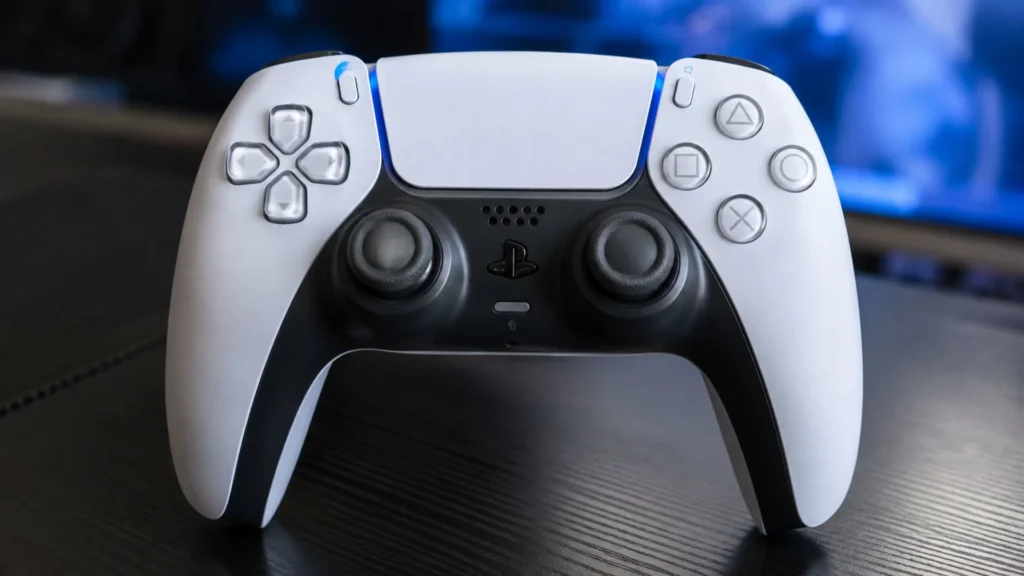
The Sony PS5 controller looks futuristic. It has a two-tone color scheme. But it’s not just about looks. It is designed for long gaming sessions. The grips are slightly larger than the old PS4 controllers. It sits in your hands perfectly.
The texture on the grips and triggers helps stop your hands from slipping. This is important when things get intense. Sony also updated the light bar. It now sits on the edges of the touchpad. It gives a cool glow without distracting you. It is a comfortable and stylish PS5 wireless controller.
A Deep Dive into the DualSense Controller Features
Built-in Microphone and Speaker
The PS5 controller has a built-in microphone. This is great for quick chats. You don’t need a headset just to say “hello” to a friend. There is also a dedicated mute button. You can quickly turn the mic off to avoid embarrassing background noise.
There is also a built-in speaker. It plays specific in-game sounds. Hearing the “woosh” of a sword or a voice come from your hands adds to the immersion. It’s a neat trick that the DualSense wireless controller pulls off well.
The Create Button
Sony swapped the “Share” button for the “Create” button. You can easily take screenshots or record videos. It allows players to create epic gameplay content to share with the world. This is perfect for bragging rights. You can capture that insane win or funny fail instantly.
Motion Sensor and USB-C Charging
The PS5 game controller has a motion sensor. In some games, you can tilt the controller to steer or aim. It adds another layer of interaction. It is also easier to charge. It uses a USB-C charging controller port. This is a modern standard. It charges faster and is easier to plug in than the old micro-USB.
Setting Up Your Official PS5 Controller
Setting up is easy. It takes just a few minutes. First, you connect the official PS5 controller to the console. Then you press the PlayStation button. The controller syncs instantly.
To set up a second controller for local multiplayer, just do the same thing. The console will ask you to assign it to a user. For PS5 controller setup, it’s mostly plug-and-play. You can adjust trigger intensity or vibration strength to your liking.
Battery Life and Charging the DualSense Wireless Controller
Battery life is a big topic. The PS5 controller battery life lasts about 6 to 12 hours. This depends on the game. Games that use heavy haptics and adaptive triggers drain the battery faster. You might need to charge it after a long session.
Charging the PS5 controller is simple via the USB-C port. You can also buy a PS5 controller charging station. This is a great accessory. It lets you keep two controllers charged and ready to go. It is a must-have for serious gamers.
Exploring PS5 Controller Colors and Customization
The standard PS5 controller colors are white and black. But Sony has released many options. There is a Galactic Purple and a Cosmic Red. These look great on your desk. They are not just for looks.
PS5 controller customization goes beyond colors. You can buy different thumbstick caps. There are also skins available. These change the look and feel. It is a fun way to make your controller unique. The PS5 controller grip is also customizable. You can add special grips for extra comfort.
DualSense Controller Review: Is It Worth the Price?
The PS5 controller review scores are overwhelmingly positive. Critics love the immersion it provides. It is a leap forward in gaming. The PS5 controller price is usually around $70 to $80 USD. It is a premium price for a premium product.
Is it worth it? Yes. If you own a PS5, you need this controller. It is the heart of the experience. The features are not gimmicks. They truly change how you play. It is the best PS5 controller you can get for the console.
Official PS5 Controller vs. Third-Party Options
There are many third-party options now. Some are very good. However, the official PS5 controller is still the best overall. It has the full feature set. Third-party controllers often miss the haptics or adaptive triggers.
If you are into competitive gaming, you might look at the DualSense Edge controller. This is Sony’s “pro” controller. It costs more but offers better customization and rear buttons. It has a shorter battery life, though. For most players, the standard official PS5 controller is the best choice.
PS5 Controller Compatibility: PC, Steam, and Mobile
The PS5 controller compatibility is excellent. It works with more than just the PS5. You can use it on a PC via Bluetooth or USB. On PC, you can use it on Steam. Steam has built-in support. You can play many games with it.
It also works with mobile devices. You can connect it to your phone via Bluetooth. This is great for mobile gaming. The controller is versatile. It’s a high-quality wireless gaming controller that works across platforms.
PS5 Controller Update and Firmware
Sony releases updates for the controller. These improve the PS5 controller firmware. You can update it on the PS5 console. You can also use the “DualSense Wireless Controller Firmware Updater” on PC. Updating is easy.
It keeps your controller running smoothly. It fixes bugs and sometimes improves performance. It is a good idea to check for updates regularly. The PS5 controller update process is simple and fast.
Maintaining Your PS5 Wireless Controller
Keep your controller clean. Use a soft cloth to wipe it down. Sticky buttons are a pain. To avoid stick drift, keep the joysticks clean. Stick drift is a known issue where the character moves on its own.
If you are a heavy gamer, consider getting a PS5 controller replacement plan. Or, learn how to replace the joysticks. The DualSense Edge controller lets you replace the stick modules easily. This is a great anti-stick drift solution. Taking care of your PS5 wireless controller will make it last longer.
What is the DualSense Edge Controller?
The DualSense Edge controller is the elite version. It is for serious players. It has lots of PS5 controller customization. It has remappable back buttons. You can swap out the thumbsticks. You can even adjust the trigger travel distance.
It also has a sleek design. However, it is expensive. The battery life is also worse than the standard model. It is for players who want total control. It includes a nice carrying case. If you play competitive games, it might be worth the upgrade.
Gamer Anecdotes: The Good, the Bad, and the Sticky
I remember playing Ratchet & Clank. I fired a weapon that shoots a cloud of bees. The haptic feedback vibrated at a super high frequency. It felt like the buzzing was in my hands. It was wild. In Returnal, the adaptive triggers simulate different fire modes. You can feel the difference between a pistol and a rifle.
My friend had a flop. He threw his controller in frustration. It hit the wall, and the R2 button broke. Replacing it cost him $70. Not the controller’s fault, but it hurts. Another friend plays FIFA. After months of intense gameplay, he got stick drift. He had to buy a new one. These are the realities of gaming.
PS5 Gaming Experience and Sony Gaming Hardware
The PS5 gaming experience is defined by the controller. It is the most innovative part of the hardware. It shows Sony is pushing boundaries. It is a big part of Sony gaming hardware.
The controller helps you feel the world. The raindrops in Demon’s Souls. The snow crunching under your feet. It all comes through the wireless gaming controller. It is the secret weapon of the PS5. It enhances every single game you play.
Best PS5 Controller: A Buying Guide
So, what is the best PS5 controller? It depends on you. For most, the standard official PS5 controller is the winner. It offers the best balance of price and features. It is the best overall PS5 controller.
If you want better customizations for competitive play, get the DualSense Edge. If you want options, look at the Nacon Revolution or Victrix Pro. But they lack the key Sony features.
PS5 Controller Accessories
There are many PlayStation 5 controller accessories. The PS5 controller charging station is a top pick. It saves you from hunting for a USB cable. A good headset is also a great accessory. It lets you use the 3.5mm jack on the controller.
You might also want thumbstick grips. These offer better grip and can last longer. A carry case is also useful. It protects your official PS5 controller when traveling. These are all great upgrades for your PS5 game controller.
Conclusion: The Verdict on the PS5 Controller
The PS5 controller is a masterpiece. It is a significant upgrade from the past. The PlayStation 5 DualSense controller makes gaming fun again. The haptic feedback and adaptive triggers are not just buzzwords. They change how you feel every game.
Whether you are buying your first official PS5 controller or replacing an old one, you will love it. It is the heart of the PS5 gaming experience. It is a powerful wireless gaming controller that delivers. Get one in your hands and feel the difference.
Q: Is the PS5 controller compatible with PC?
A: Yes! You can connect it via USB or Bluetooth. Steam has strong support for the DualSense wireless controller. You can play many PC games with it. Just keep in mind that advanced features like haptics might be limited outside of specific games.
Q: What is the battery life like on the DualSense controller?
A: It lasts around 6 to 12 hours of gameplay. The PS5 controller battery life depends on how much you use the haptic feedback and adaptive triggers. Charging is easy and fast with the USB-C port.
Q: What are adaptive triggers?
A: Adaptive triggers are a feature of the PS5 controller that can change the resistance of the L2 and R2 buttons. This creates realistic tension for actions like pulling a bowstring or firing a gun.
Q: What is the difference between the DualSense and DualSense Edge?
A: The DualSense Edge is a high-performance PS5 controller designed for competitive players. It offers customization options like remappable back buttons and replaceable thumbsticks. However, it has a shorter battery life than the standard Sony PS5 controller.
Q: Why is my PS5 controller battery life so short?
A: The PS5 controller battery life can be short if you are playing games that heavily use haptic feedback and adaptive triggers. Reducing the intensity of these features in your console settings can help you get more gaming time out of a single charge.
Read More: MSI LoL 2026
About the Author